Lone-worker safety software for UK teams
Know when your lone workers are safe. Know when they’re not responding.
Set scheduled welfare check-ins for your team. Workers respond without installing an app. If someone misses a check, NALW sends a reminder, Zoe makes an AI voice call, and unresolved alerts escalate to the people you choose. Every step is recorded.
From £49/month · No specialist hardware · Customer-managed escalation
How it works
Set it up once. Workers reply in one tap.
You choose who is checked, when, and who is alerted. NALW runs the check-ins and the follow-up.
Set up your team
Add workers, create a one-off or repeating check-in schedule, and choose your escalation contacts in order.
Workers check in
At each time, the worker gets a text with a link (or an email, or a call from Zoe) and taps I’m safe. They can also reply in their own words.
Misses are followed up
No reply means reminders, then a call from Zoe, then the people you chose are alerted one by one until someone takes it on.
Everything is recorded
Each check, reply, alert and acknowledgement is time-stamped, with PDF and CSV reports on the plans that include them.
Zoe, the AI voice assistant
Meet Zoe. The AI voice that follows up when a check-in is missed.
Zoe calls as “Zoe from your organisation”, in plain spoken English, and asks whether the worker is OK. She says she is an AI if asked directly.
- Scheduled check-inA check-in goes to the worker by text link, email or call at the times you set.
- ReminderNo reply? NALW sends reminders, by default every 5 minutes, up to twice.
- Zoe voice callZoe, an AI voice assistant, phones the worker for a quick safety check. She says she is an AI if asked.
- EscalationStill no safe answer? The people you chose are alerted in order, by email, text and call.
- Audit trailEvery step, reply and acknowledgement is time-stamped on the incident record.
What Zoe does with the answer
- A clear “I’m fine” closes the check as safe. Only the worker’s own words count.
- Any sign of trouble, or no clear answer from someone on the line, starts escalation straight away and Zoe keeps asking the questions responders need.
- Voicemail or no answer is logged, the check stays open and the normal timers carry on to escalation.
Calls are not audio-recorded. A text transcript is kept on the check record.
Zoe Hi Sam, it's Zoe from Example Ltd. Quick safety check. You OK?
Worker Yeah, all good. Just finishing up here.
Zoe Lovely, thanks. Take care.
System: Check closed as safe. The call is added to the audit trail as a text transcript.
Illustrative only: not a recording. Zoe uses the name of your organisation, here a made-up “Example Ltd”. Real calls vary with what the worker says.
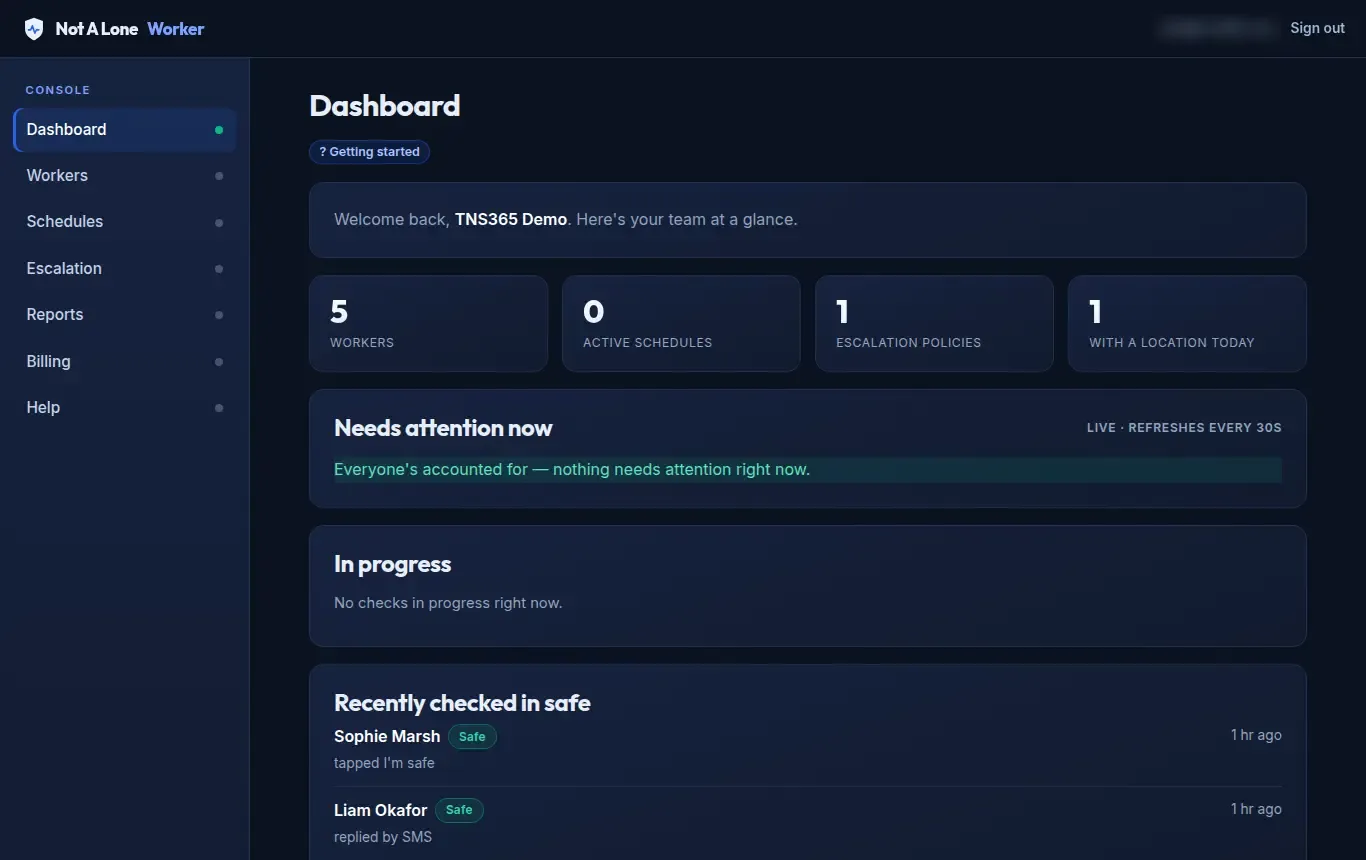
The product
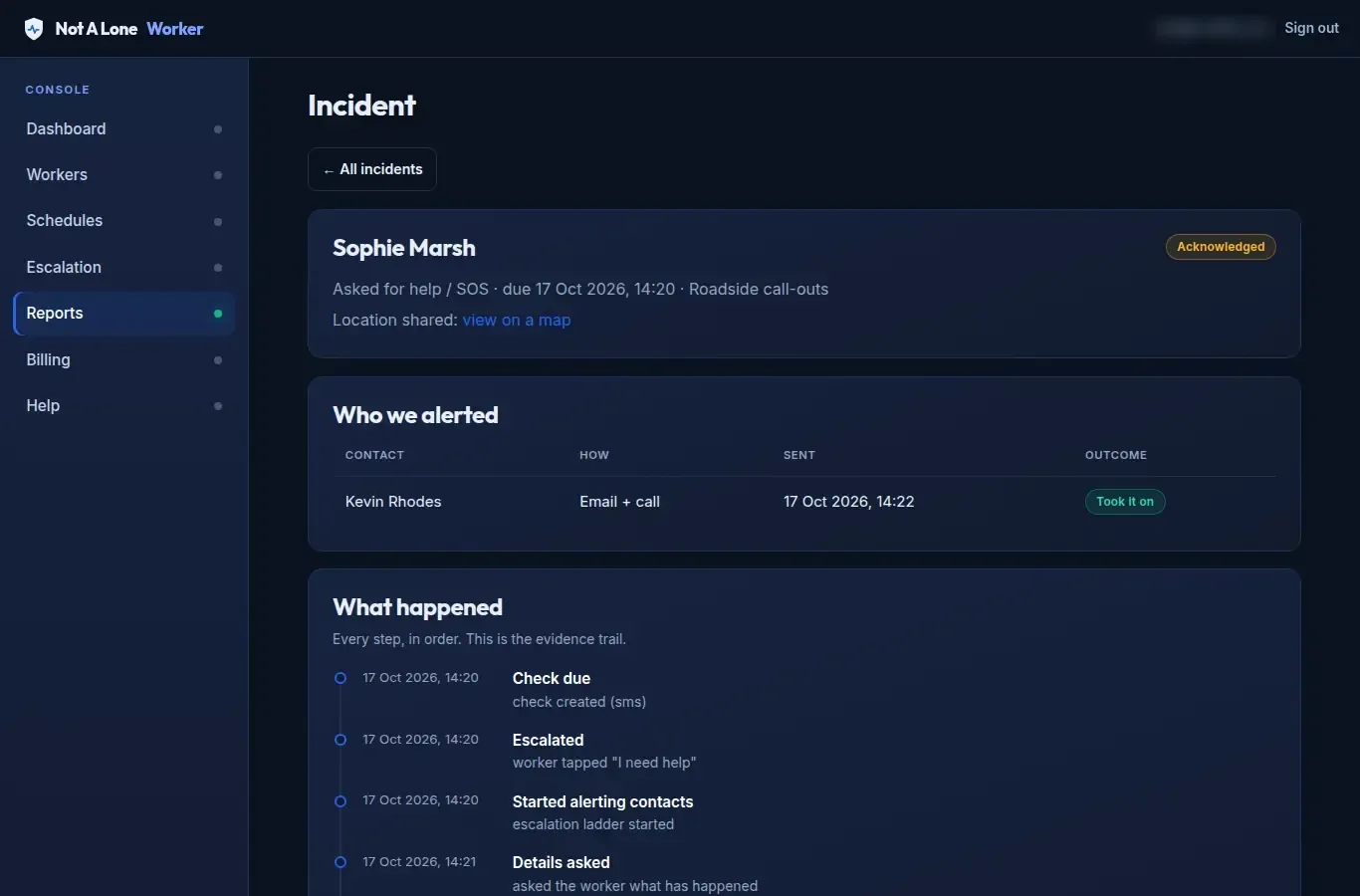
A clear record of every check and every escalation
This is the incident record in the console: who was alerted, how, who took it on, and how it was closed.
- Time-stamped steps from the missed check to the close-out.
- What the worker said, and who was alerted by email, text or call.
- Closed by a person with an outcome and a note.
Why teams use it
Three practical benefits
No app or hardware
Workers get a link by text or email and open it in the phone’s normal browser. There is nothing to install and no device to buy or charge.
Follow-up without chasing
Reminders, Zoe’s call and the escalation ladder run on their own, so your team is not phoning round to find out who has not replied.
A record you can show
Every step is time-stamped on the incident record, so you can show how your lone-working procedure ran in practice.
Who it’s for
Teams that work alone, out of sight or out of hours
When a check-in is missed
What happens, and when
These are the default timings. You can change the grace period, retries and whether Zoe calls on each schedule.
- Check-in link sentWith self check-in on, the worker has 15 minutes to tap it.
- RemindersThe check is sent on the schedule’s channel and repeated every 5 minutes, up to twice more.
- Zoe callsIf voice follow-up is on (it is by default) and a phone number is on file, Zoe rings. She has about 5 minutes before escalation.
- Your contacts are alerted in orderBy email, text and/or call, with 5 minutes between contacts. Anyone who acknowledges stops the ladder.
- Account owner final alertEmail, text and call. The ladder does not repeat.
NALW alerts the people you chose. It does not send anyone to site or contact the emergency services. If nobody responds, the incident stays red on your dashboard until a person acknowledges or closes it.
Straight answers
What if…?
What if a worker has no signal?
Check-ins reach a worker by SMS, email or an AI voice call, so they need mobile signal or data at that moment. We cannot guarantee contact without signal. If a worker can't be reached, it is handled exactly like a missed check-in: NALW sends reminders (by default every 5 minutes, up to twice), then Zoe tries a voice call, and if there is still no safe answer the escalation ladder starts and the people you chose are alerted.
If your team works in known dead spots, plan around them: for example check in before entering and again on leaving, or choose shorter intervals. Where a worker has shared a location on an earlier check-in, the last known location is shown to the people alerted.
What if a worker ignores the SMS?
Nothing is assumed. If there is no reply, NALW sends reminders (by default every 5 minutes, up to twice). Then, where voice follow-up is switched on for the schedule (it is on by default) and a phone number is on file, Zoe phones the worker for a quick safety check. Only when that also goes unanswered does escalation to your chosen contacts begin.
A worker can reply in their own words. If the reply says they are fine, the check is closed; if it says they need help, escalation starts at once.
What if nobody on the escalation list answers?
Your contacts are alerted in the order you set, by email, a text with a link to take over, and/or an AI voice call, depending on how you set each one up. If one doesn't acknowledge within 5 minutes, the next is alerted. After the last contact, the account owner gets a final alert by email, SMS and phone call. The ladder does not repeat.
If nobody responds, the incident stays red on your dashboard until a person acknowledges or closes it, and a late acknowledgement still works. NALW does not send anyone to site and does not contact the emergency services for you, so your own procedure should say who calls 999 and when.
What if a worker checks in late?
With self check-in the worker gets a link and, by default, 15 minutes to tap it. If they haven't, NALW sends the check on the schedule's channel, retries every 5 minutes up to two more times, and then Zoe calls. Only after that does escalation start.
A reply that arrives after escalation has started is recorded as a late reply. If it says they are safe, the ladder stands down and everyone already alerted is told; the incident stays open until a person closes it. If it says they are not OK, the ladder keeps running.
Do workers need to install an app?
No. Check-ins arrive as a text message with a link that opens in the phone's normal browser (or as an email button, or as a phone call from Zoe), and the worker taps I'm safe or I need help. They can also reply to the text. It works on any phone that can receive an SMS or a call.
Pricing
Simple monthly plans
Prices exclude VAT. Billed monthly.
About
About TNS 365 Limited
Not A Lone Worker is developed by TNS 365 Limited, a UK company with experience in call handling and operational communications.
- Company
- TNS 365 Limited, company no. 11151109
- Address
- Heritage Exchange, Wellington Mills, Plover Road, Huddersfield HD3 3HR
From the blog
Lone-worker safety, explained
The true cost of a missed welfare check (and how to make them impossible to miss)
A missed welfare check rarely announces itself. The real cost is the silent hours before anyone notices — and it's exactly that gap you can design away.
Night shifts, empty sites: lone worker safety in security & facilities
Nights, empty buildings and long solo patrols define lone working in security and facilities. Here's how to keep those workers genuinely safe, not just monitored.
Protecting housing officers on home visits: a safety playbook
Home visits put housing officers in unfamiliar, unpredictable settings, often alone. Here's a practical safety playbook for before, during and after the visit.
Know when your lone workers are safe
Tell us about your team and we'll arrange access or a demonstration.
From £49/month · No specialist hardware · Customer-managed escalation